OneKey Switch: Lang / Copy / Paste
A downloadable tool for Windows
OneKey Switch beta ⚡
Switch language, copy & paste — with a single key.
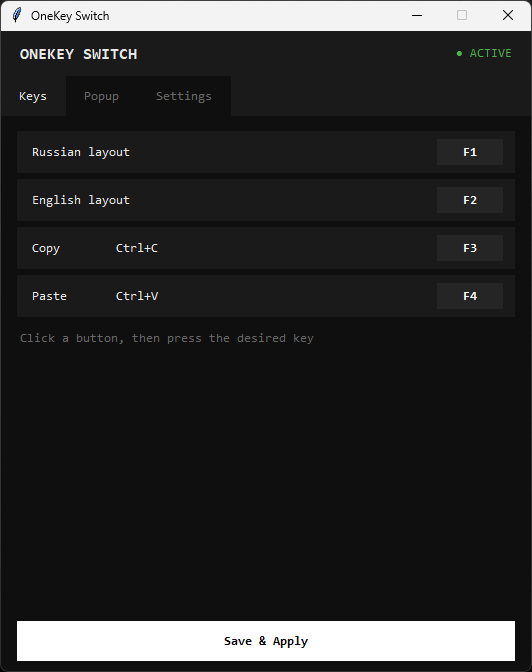
A lightweight Windows utility that speeds up your workflow with text and files. Assign actions to F1–F4 and control your keyboard layout and clipboard without Alt+Shift or Ctrl+C/V.
🔑 Features:
- F1 / F2 → instant RU/EN layout switch
- F3 / F4 → copy / paste (text, files, images)
- 🪟 Visual popup confirmation for every action
- 🎨 Themes, positioning, bilingual interface (RU/EN)
- 🧊 Runs in system tray — set it and forget it
⚠️ Important before launch:
Switch your keyboard layout to English (EN) before starting the app. This is required for the copy/paste function to initialize correctly. After launch, language switching works freely in any application.
🚀 How to use:
- Run as Administrator (required!)
- Make sure English layout is active at launch
- Click "Save & Apply" in settings — the window closes, app stays in tray
- Start using:
F1–F4work globally across all apps
⚙️ Requirements:
- 🪟 Windows 7/8/10/11
- 🔐 Administrator privileges
- 🇬🇧 English keyboard layout at launch (for clipboard functions)
💡 Beta version: Currently only F1–F4 keys are supported. Arbitrary key binding coming in future updates.
OneKey Switch — less motion, more speed. ⚡
Onekey switch between any language and English.
Works with Russian, Spanish, French, German — any language, as long as English is installed.
Download
Leave a comment
Log in with itch.io to leave a comment.